Conway’s Game of Life is a famous cellular automaton devised by British mathematician John Horton Conway in 1970. It is a zero-player game: you define an initial state and then watch it evolve according to a fixed set of rules — no further input required. Despite its simple rules, it produces surprisingly complex, lifelike patterns.
In this post we implement Game of Life in Go from scratch, step by step. By the end you will have a working terminal simulation that renders a Glider and a Lightweight Spaceship (LWSS) in real time.
Prerequisites
You need Go installed on your machine. The standard library is sufficient — no third-party packages are required for this tutorial.
Linux / macOS:
# Verify installation
go version
Windows (PowerShell):
# Verify installation
go version
If go version prints something like go version go1.22 linux/amd64 you are good to go. If not, follow the official installation guide.
Create a new file called main.go in an empty directory and follow along.
Rules
The Game of Life follows four rules, applied simultaneously to every cell on the grid at each step:
- A live cell with fewer than two live neighbours dies — underpopulation.
- A live cell with two or three live neighbours survives.
- A live cell with more than three live neighbours dies — overpopulation.
- A dead cell with exactly three live neighbours becomes alive — reproduction.
These four rules are all you need. The rest emerges from the initial state.
Implementation
We break the implementation into five focused steps.
1. Define the Data Structures
Cell is just a boolean — alive or dead. Grid holds the dimensions and a two-dimensional slice of cells.
type Cell bool

type Grid struct {
    Width  int
    Height int
    Cells  [][]Cell
}
2. Initialise the Grid
NewGrid allocates the two-dimensional slice and places the initial live cells at the given coordinates.
func NewGrid(width, height int, initialLiveCells [][2]int) Grid {
    cells := make([][]Cell, height)
    for i := range cells {
        cells[i] = make([]Cell, width)
    }

    for _, coord := range initialLiveCells {
        x, y := coord[0], coord[1]
        cells[y][x] = true
    }

    return Grid{Width: width, Height: height, Cells: cells}
}
3. Implement the Game Logic
NextState computes the next generation. We allocate a fresh slice so we never read and write the same state simultaneously — a classic off-by-one mistake in Game of Life implementations.
func (g *Grid) NextState() {
    newCells := make([][]Cell, g.Height)
    for i := range newCells {
        newCells[i] = make([]Cell, g.Width)
    }

    for y := 0; y < g.Height; y++ {
        for x := 0; x < g.Width; x++ {
            liveNeighbors := g.countLiveNeighbors(x, y)

            if g.Cells[y][x] && (liveNeighbors == 2 || liveNeighbors == 3) {
                newCells[y][x] = true
            } else if !g.Cells[y][x] && liveNeighbors == 3 {
                newCells[y][x] = true
            }
        }
    }

    g.Cells = newCells
}
countLiveNeighbors checks the eight surrounding cells. The % operator creates a toroidal grid — cells that leave one edge reappear on the opposite side, so the simulation never has boundary artifacts.
func (g *Grid) countLiveNeighbors(x, y int) int {
    count := 0
    for i := -1; i <= 1; i++ {
        for j := -1; j <= 1; j++ {
            if i == 0 && j == 0 {
                continue
            }

            // Wrap around: (x + offset + Width) % Width keeps the value in [0, Width)
            x2 := (x + i + g.Width) % g.Width
            y2 := (y + j + g.Height) % g.Height

            if g.Cells[y2][x2] {
                count++
            }
        }
    }
    return count
}
4. Render the Grid
Render prints the grid to the terminal. Live cells appear as █, dead cells as a space. The ANSI escape sequence \033[H moves the cursor to the top-left corner before each frame, preventing the output from scrolling — giving a smooth animation effect.
func (g *Grid) Render() {
    // Move cursor to top-left without clearing (avoids flicker)
    fmt.Print("\033[H")
    for y := 0; y < g.Height; y++ {
        for x := 0; x < g.Width; x++ {
            if g.Cells[y][x] {
                fmt.Print("█")
            } else {
                fmt.Print(" ")
            }
        }
        fmt.Println()
    }
}
5. Set Up the Main Loop
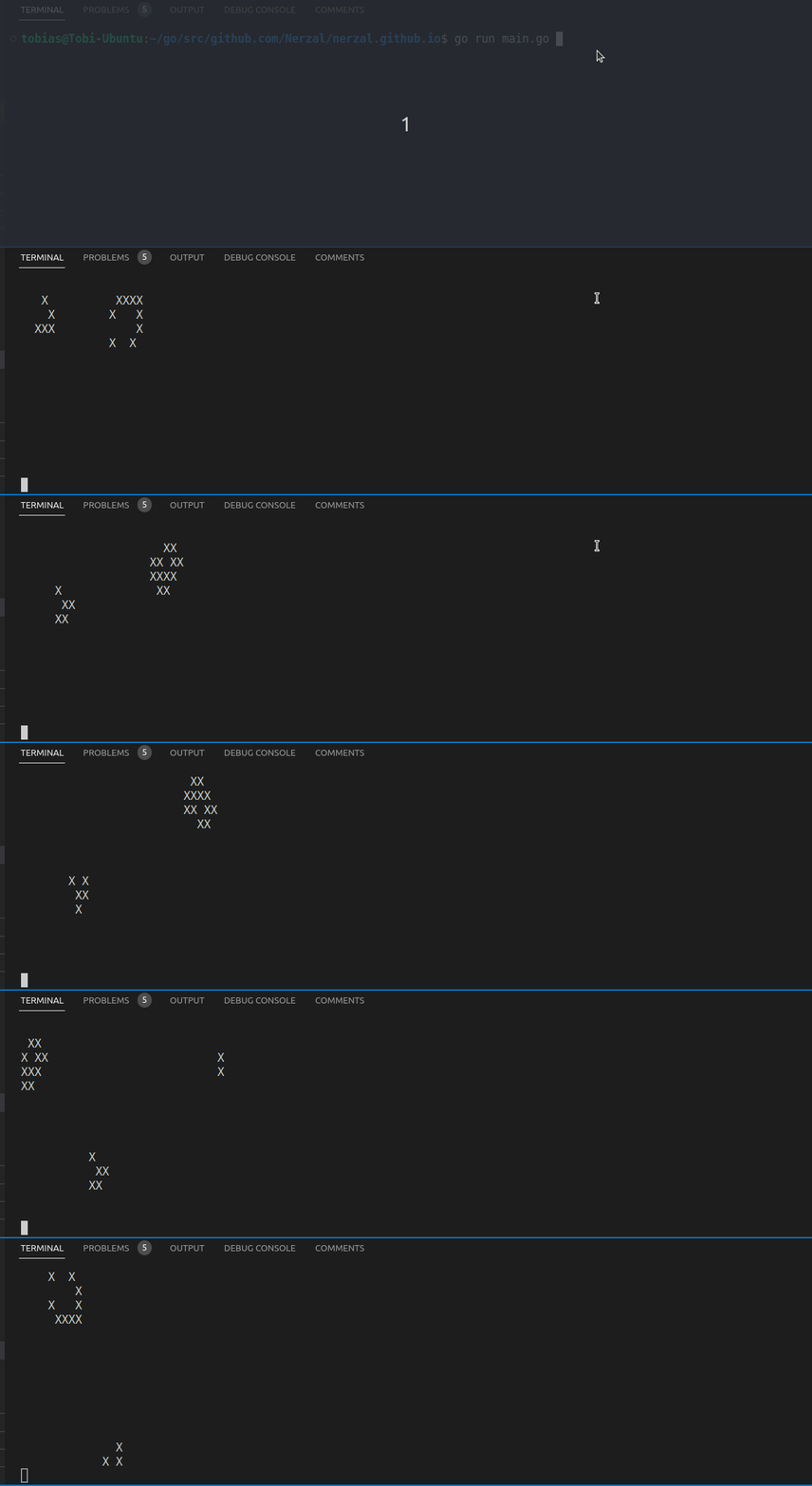
We seed the grid with two well-known patterns — a Glider (moves diagonally across the grid) and a Lightweight Spaceship (LWSS) (moves horizontally) — then run the simulation indefinitely.
func main() {
    initialLiveCells := [][2]int{
        // Glider — travels diagonally
        {1, 0}, {2, 1}, {0, 2}, {1, 2}, {2, 2},

        // Lightweight Spaceship (LWSS) — travels horizontally
        {10, 2}, {11, 2}, {12, 2}, {13, 2},
        {9, 3}, {13, 3},
        {13, 4},
        {9, 5}, {12, 5},
    }

    // Clear terminal once at the start
    fmt.Print("\033[2J")

    grid := NewGrid(40, 20, initialLiveCells)
    for {
        grid.Render()
        grid.NextState()
        time.Sleep(100 * time.Millisecond)
    }
}
Complete Code
Save this as main.go:
package main

import (
    "fmt"
    "time"
)

type Cell bool

type Grid struct {
    Width  int
    Height int
    Cells  [][]Cell
}

func NewGrid(width, height int, initialLiveCells [][2]int) Grid {
    cells := make([][]Cell, height)
    for i := range cells {
        cells[i] = make([]Cell, width)
    }
    for _, coord := range initialLiveCells {
        x, y := coord[0], coord[1]
        cells[y][x] = true
    }
    return Grid{Width: width, Height: height, Cells: cells}
}

func (g *Grid) NextState() {
    newCells := make([][]Cell, g.Height)
    for i := range newCells {
        newCells[i] = make([]Cell, g.Width)
    }
    for y := 0; y < g.Height; y++ {
        for x := 0; x < g.Width; x++ {
            liveNeighbors := g.countLiveNeighbors(x, y)
            if g.Cells[y][x] && (liveNeighbors == 2 || liveNeighbors == 3) {
                newCells[y][x] = true
            } else if !g.Cells[y][x] && liveNeighbors == 3 {
                newCells[y][x] = true
            }
        }
    }
    g.Cells = newCells
}

func (g *Grid) countLiveNeighbors(x, y int) int {
    count := 0
    for i := -1; i <= 1; i++ {
        for j := -1; j <= 1; j++ {
            if i == 0 && j == 0 {
                continue
            }
            x2 := (x + i + g.Width) % g.Width
            y2 := (y + j + g.Height) % g.Height
            if g.Cells[y2][x2] {
                count++
            }
        }
    }
    return count
}

func (g *Grid) Render() {
    fmt.Print("\033[H")
    for y := 0; y < g.Height; y++ {
        for x := 0; x < g.Width; x++ {
            if g.Cells[y][x] {
                fmt.Print("█")
            } else {
                fmt.Print(" ")
            }
        }
        fmt.Println()
    }
}

func main() {
    initialLiveCells := [][2]int{
        {1, 0}, {2, 1}, {0, 2}, {1, 2}, {2, 2},
        {10, 2}, {11, 2}, {12, 2}, {13, 2},
        {9, 3}, {13, 3},
        {13, 4},
        {9, 5}, {12, 5},
    }
    fmt.Print("\033[2J")
    grid := NewGrid(40, 20, initialLiveCells)
    for {
        grid.Render()
        grid.NextState()
        time.Sleep(100 * time.Millisecond)
    }
}
Running the Program
Linux / macOS:
go run main.go
Windows (PowerShell):
go run main.go
Press Ctrl+C to stop. You should see the Glider and LWSS patterns moving across the terminal.
What’s Next
- Try different starting patterns — the LifeWiki catalogues thousands of them.
- Replace
fmt.Printwith a proper terminal library like tcell or bubbletea for colour and keyboard input. - If you are interested in containerising your Go applications, check out my post on Go and Docker.