Series: Building Level Time. Part 1 (this post): addon architecture · Part 2: testing Lua with Go · Part 3: the release pipeline · Part 4: Goals and the public API · Product page: Level Time
Level Time is a World of Warcraft addon I write in Lua and maintain with a bit of Go tooling. It is public on CurseForge and on GitHub. This series is the engineering story behind it: how the addon is built, how I test Lua from Go, how a release gets out the door, and how a second addon plugs into the first one.
This first part is about the shape of the thing. An addon is a program that runs inside somebody else’s process, in a language version somebody else picked, on four different game clients, with a persistence mechanism that is just “the client dumps your global tables into a file”. If you have never written one, this post is a guided tour. If you have, you may still find a few patterns worth stealing.
What Level Time does, and for whom
Level Time tracks play time, XP per hour, kills, deaths, quests and gold for your current level, your current session and the instance you are in. It keeps a history of every level, session and run for all your characters, so you can answer questions like “how long did level 34 take me, and was that faster than my last character?”
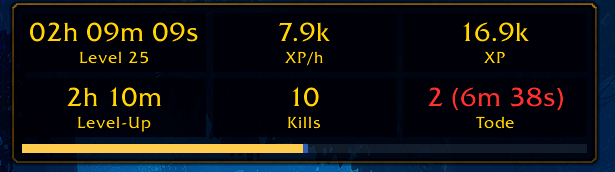
The “tiles” layout. Level Time has seven layouts in total.
Three groups of players are the main audience:
- Levelers who want to know whether their route is actually efficient. XP/h, time to level and the history charts are for them.
- Speedrunners who want LiveSplit-style splits per level, comparison against a personal best and an export to LiveSplit.
- Streamers who need displays that look good on stream: a text-only layout without background, a chroma-key background for OBS, hidden names and a recap card.
Everything is configurable, most extras are off by default, and the addon runs on Retail, Classic Era, TBC Anniversary and WoW Forever from one download. It is actively developed; I describe the state of the repository as I write this, not a finished product.
How a WoW addon works
If you know browser extensions or game mods, the model will feel familiar, with a few unusual constraints.
The TOC file
An addon is a folder under Interface/AddOns/. The only thing the client strictly needs is a .toc file named after the folder. It is a plain text manifest, documented in the TOC format reference. It has ## Key: value metadata lines, followed by the list of files to load, in that order. Here is the head of Level Time’s (shortened):
## Interface: 120105, 11509, 20506, 16001
## Title: Level Time
## Notes: Statistics per level and per session ...
## SavedVariables: LevelTimerDB, LevelTimerStatsDB, LevelTimerDebugLog
## SavedVariablesPerCharacter: LevelTimerCharDB

Locales\Core.lua
Locales\enUS.lua
Lib\Migrate.lua
Core\Database.lua
Lib\Lifecycle.lua
Core\LevelTimer.lua
Core\Client.lua
...
Tracking\Stats.lua
There is no module system, no require, no bundler. The load order in the TOC is the dependency graph. If file B uses something file A defines, A must be listed first, and forgetting to add a new file to the TOC means it silently never loads. I come back to what that means for structure below.
Everything shares one namespace
Each file is executed with two hidden arguments: the addon name and a table that is shared by all files of this addon. That table is the only sanctioned way to share code without polluting the global environment:
-- first line of nearly every file in the addon
local _, ns = ...

local Stats = {}
ns.Stats = Stats          -- now every later file can use ns.Stats
This is the whole module system. ns.Stats, ns.Journal, ns.Format and so on are just tables hung on a shared table. Level Time also exposes that table globally as LevelTimerAPI, which is how the sister addon in Part 4 uses it.
Events, not threads
The game runs your Lua code on one thread, inside the game’s own frame loop. There are no threads, no sleep, no blocking I/O. Anything long-running freezes the whole game UI, so the unit of work is a small callback.
Callbacks are triggered by events. You create a hidden frame (the UI primitive that can receive events), register for the event names you care about, and set an OnEvent script. The event list on the wiki is your friend; PLAYER_XP_UPDATE, PLAYER_LEVEL_UP, PLAYER_DEAD and TIME_PLAYED_MSG are the ones Level Time lives on.
For periodic work there is the OnUpdate script (reference), which fires every rendered frame with the elapsed seconds. At 144 FPS that is 144 calls per second, so the rule is: do nothing in OnUpdate unless a throttle says it is time.
SavedVariables
Persistence is delightfully crude. You declare global variable names in the TOC; the client loads them from a file before PLAYER_LOGIN, and writes them back when you log out or /reload:
-- Variables listed in "## SavedVariables" are plain globals.
-- They are nil on the very first run, so always default them.
LevelTimerDB = LevelTimerDB or {}
The details are on the wiki: saving variables between game sessions. Two consequences matter for design:
- The whole table is serialized on every logout and parsed on every login. Size is load time.
- There is no schema, no transaction, no versioning. If you change your data layout, you write the migration.
Both of these shaped the design of Level Time, as you will see in the sections on the journal archive and migrations.
Lua 5.1 and the sandbox
The client embeds Lua 5.1 (manual) with a restricted standard library and a large API on top, documented at warcraft.wiki.gg. Newer Retail versions also hide some values from addons entirely (“secret values”), which I will get to in the multi-client section.
The module layout
The repository is organized by domain, not by technical layer:
| Folder | Responsibility |
|---|---|
Locales/ | English, German, French and Spanish strings |
Core/ | database, client detection, slash commands, profiler, debug tools |
Lib/ | domain-free helpers: formatting, serializer, widgets, the event/lifecycle kernel |
Tracking/ | counters and event producers: kills, deaths, quests, money, XP, loot, the journal |
History/ | level history, analysis, forecast, goals, personal records |
Speedrun/ | runs, splits, records, LiveSplit export |
Assist/ | optional comfort features, reminders, warnings |
UI/ | windows, stat lines, alerts, options, layouts |
Because the TOC order is the dependency order, the folders do not decide what may depend on what; the discipline does. The rule I follow is the same one from my post on bounded contexts: keep the data modules free of UI knowledge, and let UI modules ask data modules for values, never the other way round.
The kernel: one event frame, many listeners
The most important file is Lib/Lifecycle.lua. Instead of every module creating its own frame, there is one event frame and a registry in front of it. Modules call ns.RegisterEvent(event, handler), and any number of modules can subscribe to the same event. Handlers run in registration order, which is TOC order. Here is a simplified version of the idea:
-- simplified from Lib/Lifecycle.lua
local eventFrame = CreateFrame("Frame")
local handlersByEvent = {}

function ns.RegisterEvent(event, handler)
  if not handlersByEvent[event] then
    -- pcall: a client that does not know this event throws, we return false instead
    if not pcall(eventFrame.RegisterEvent, eventFrame, event) then
      return false
    end
    handlersByEvent[event] = {}
  end
  table.insert(handlersByEvent[event], handler)
  return true
end

eventFrame:SetScript("OnEvent", function(_, event, ...)
  for _, handler in ipairs(handlersByEvent[event]) do
    ns.SafeCall(handler, ...)
  end
end)
Two details make this more than a convenience wrapper.
Isolation. ns.SafeCall wraps every handler, every login callback and every repeating task in xpcall. An error in one module goes to the client’s error handler (BugSack, the default error window) and the next handler still runs. For an addon with a few hundred files written over time, one broken feature must not take down the level timer.
Portability. If a client does not know an event, RegisterEvent throws. The wrapper turns that into a false return value, and the feature that needed the event simply stays off. That is the first of several “degrade quietly” mechanisms in the multi-client section.
There are siblings of this function for the other recurring needs: ns.RegisterUnitEvent (only deliver UNIT_AURA for the player instead of every nameplate and party member), ns.Every(seconds, fn, enabled) (a repeating task on one shared OnUpdate frame; tasks whose feature is off cost nothing), ns.OnLogin, ns.OnLogout and a two-phase level-up. Modules register ns.RegisterApply(fn) callbacks that rebuild their state from the settings table whenever a setting changes, which is why switching the language works live.
Tracking: counters and a journal
Tracking/ turns raw events into two kinds of data.
Counters. Stats keeps every counter in scopes. A counter exists once for the current level and once for the current session, and Stats.Increment always counts in both. The instance scope works the same way for the dungeon you are in. A producer such as the kill counter does not know about scopes:
-- simplified from Tracking/KillCounter.lua
local function countKill(name, xp)
  local classification = Classification.Of(name)
  Stats.Increment(Stats.PVE_KILLS)
  Stats.Increment(Stats.XP_KILLS, xp or 0)
  if Classification.IsElite(classification) then
    Stats.Increment(Stats.ELITE_KILLS)
  end
  Journal.AddKill(name, classification, xp)
end
The UI can then ask Stats.Get(scope, counter) and switch between “Level 34”, “Session” and “Instance” with a tab, without any producer changing.
The journal. Counters tell you how many; the journal tells you what. Every kill, death, quest, loot item, instance run and near death becomes an entry with a timestamp, level and zone. The history window’s tables and charts are built from it.
Some producers are not trivial. On recent Retail and WoW Forever clients the combat log text for XP gains is sometimes a secret value: the addon can pass it around but not read it. The kill counter then waits a short delay, correlates the kill message with nearby XP changes, and records a kill without a name. That is documented in the code as a trade-off: the sum stays correct, the distribution among simultaneous kills does not.
History: snapshots at the right moment
History/ consumes the counters and journal. The pattern that matters most is the level-up in two phases. Listening to PLAYER_LEVEL_UP directly would make every module guess whether its values are already reset. Instead the kernel provides:
ns.OnLevelCompleted(fn(oldLevel))while the old values are still intact,- then
ns.levelis updated, - then
ns.OnLevelStarted(fn(newLevel))for resets.
The history module snapshots the finished level in phase one:
-- simplified from History/History.lua
ns.OnLevelCompleted(function(completedLevel)
  ns.character.levelHistory[completedLevel] = {
    level = completedLevel,
    seconds = Stats.GetSeconds(Stats.LEVEL),
    counters = Stats.Snapshot(Stats.LEVEL),
    completedAt = time(),
    totalPlayed = PlayedTime.GetTotalSeconds(),
  }
end)
Everything else (analysis series, forecast to max level, personal records, speedrun splits) is computed from levelHistory, the journal and the counters. The play time per level comes from the server’s /played response, which is why a Level Time installed mid-level still shows the correct time.
UI: polling beats pushing
Data modules expose getters; windows read them. The main window never receives “stat X changed” calls. Instead any change marks it dirty, and a throttled OnUpdate redraws:
-- simplified from UI/TimerWindow.lua
local UPDATE_INTERVAL = 0.25
local dirty, sinceUpdate = true, 0

Stats.OnIncrement(function() dirty = true end)
ns.RegisterEvent("PLAYER_XP_UPDATE", function() dirty = true end)

ns.SetUpdateScript(window, "TimerWindow", function(_, elapsed)
  sinceUpdate = sinceUpdate + elapsed
  if sinceUpdate < UPDATE_INTERVAL then return end
  sinceUpdate = 0
  if dirty or secondChanged() then
    dirty = false
    refresh()
  end
end)
Four checks per second, a redraw only when something changed or a second ticked (the play time counter), and text is set only if it differs. A flood of events during a big pull costs a flag write each, not a layout pass each.
The seven layouts (table, bar, compact, text only, clock, XP bar, tiles) are registered in a small registry (Layouts.Register(id, { Build, Render, Measure })). Build runs only when the structure changes, Render runs per tick and reports whether any text changed. Adding a layout is one file, and the stat lines are one shared list (ns.STAT_LINES) from which both the window rows and the option toggles are generated.
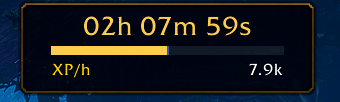
Compact: time, XP bar and up to three values you choose.
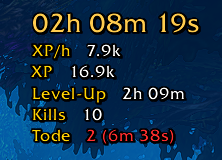
Text only: no background, outlined text. Made for stream overlays.

The one-line info bar. Some screenshots in this series show windows from before the latest release.
The journal archive: a load-on-demand addon
Here is the problem the SavedVariables design creates. A long-running character accumulates a journal of kills, deaths, loot and quests that can reach tens of thousands of entries (the code caps kills at 250,000), and without an archive all of them are Lua tables in LevelTimerStatsDB. Everything in a SavedVariable is parsed at login and serialized at logout, whether or not you ever open the history. For a feature most players open rarely, that is a poor trade.
WoW has a feature for exactly this: load-on-demand addons. A TOC with ## LoadOnDemand: 1 is not loaded at login. Its files and its SavedVariables are only read when some other code calls LoadAddOn (C_AddOns.LoadAddOn). The client also only writes that file back in sessions where the addon was loaded. So Level Time ships a second, tiny addon:
## Title: Level Time (Archive)
## Dependencies: LevelTimer
## LoadOnDemand: 1
## SavedVariables: LevelTimerArchiveDB

Archive.lua
Archive.lua contains no logic at all; it exists so the client has a file to attach the SavedVariable to. The logic lives in the main addon (Tracking/JournalArchive.lua). The design, in short:
- New journal entries go to an inbox in the character’s normal data. Constants in the code:
INBOX_MAX = 3000,KEEP_RECENT = 500. - At login, if an inbox exceeds
INBOX_MAXentries, the archive addon is loaded, and everything except the newestKEEP_RECENTentries per log is moved there. Opening the history window (or any chart that reads archive entries) also loads it. After that it stays loaded for the session. - Archived entries are stored compactly by
RecordCodec: one text line per entry with the fields in fixed order, and strings (names, zones, item links) stored once in a per-character dictionary and referenced by number. The comment in the source puts a kill line at about 30 bytes instead of 100 to 150 as a Lua table; I did not benchmark that independently. - If the archive addon is missing or disabled, loading fails once, the state becomes
unavailable, and everything simply stays in the inbox. The inbox is capped (INBOX_LIMIT = 20000plus a slack) so it cannot grow forever.
-- simplified from Tracking/JournalArchive.lua
local function loadAddOn(name)
  local load = (C_AddOns and C_AddOns.LoadAddOn) or LoadAddOn
  if not load then return false end
  local ok, loaded = pcall(load, name)
  return ok and loaded and true or false
end
Note the C_AddOns.LoadAddOn or LoadAddOn fallback: newer clients moved the function into a namespace, older ones have only the global. You will see that pattern a lot.
The result: login and logout cost stays flat no matter how big the history gets, and a player who never opens the journal never pays for it.
One download, four clients
Retail, Classic Era, TBC Anniversary and WoW Forever differ in API availability, UI templates and even which values addons may read. Level Time does not ship four builds. It uses three mechanisms.
1. One TOC with several interface versions. The line ## Interface: 120105, 11509, 20506, 16001 lists one interface number per client; the client loads the addon if its own number is in the list. The file list is the same for everybody. Interface numbers come from GetBuildInfo, whose fourth return value is the same number.
2. Client detection from that number. Core/Client.lua is about fifty lines:
-- simplified from Core/Client.lua
function Client.GetInterfaceVersion()
  return select(4, GetBuildInfo())
end

function Client.IsForever()
  local version = Client.GetInterfaceVersion()
  return version >= 16000 and version <= 16999
end

function Client.IsRetail()
  return Client.GetInterfaceVersion() >= 100000
end
It is used for features that exist in one client only. The camp fire and sleeping bag timers, for example, are WoW Forever features: their options simply do not appear in the other clients. The packaging side uses the same mapping, which keeps the code and the release in agreement.
3. Feature detection for everything else. Most differences are not “which client is this” but “does this function exist”. The code asks the API instead of the version:
-- simplified from Tracking/Experience.lua
local function isAtMaxLevel()
  if GameRulesUtil and GameRulesUtil.IsPlayerAtEffectiveMaxLevel then
    return GameRulesUtil.IsPlayerAtEffectiveMaxLevel()
  end
  if IsPlayerAtEffectiveMaxLevel then
    return IsPlayerAtEffectiveMaxLevel()
  end
  return GetMaxPlayerLevel ~= nil and ns.level >= GetMaxPlayerLevel()
end
Three clients, three ways to ask the same question, one function. The same idea covers events (RegisterEvent returning false), unit events (use RegisterUnitEvent if the frame has it, otherwise filter manually) and secret values (issecretvalue is checked before a value is compared). Guild bank repairs check for the API (CanGuildBankRepair) and the client.
The honest downside: nothing checks this for me automatically. My test harness (the subject of Part 2) fakes the API and can load the addon as different clients, but it verifies logic, not whether a function really exists on a given client. In-game testing on each client stays necessary, and the project keeps a manual checklist for exactly that.
SavedVariables schema and migrations
Since the client gives me no schema, I built a minimal one. Lib/Migrate.lua is 33 lines:
-- simplified from Lib/Migrate.lua
function Migrate.Run(data, migrations, targetVersion)
  local version = data.schemaVersion or 1
  if version >= targetVersion then return end
  for nextVersion = version + 1, targetVersion do
    if migrations[nextVersion] then
      migrations[nextVersion](data)
    end
  end
  data.schemaVersion = targetVersion
end

function Migrate.ApplyDefaults(data, defaults)
  for key, value in pairs(defaults) do
    if type(value) == "table" then
      if type(data[key]) ~= "table" then data[key] = {} end
      Migrate.ApplyDefaults(data[key], value)
    elseif data[key] == nil then
      data[key] = value
    end
  end
  return data
end
Each saved table carries a schemaVersion; a table of migrations is keyed by target version. There are separate version lines for account settings (LevelTimerDB, currently schema 7) and per-character statistics (LevelTimerStatsDB, currently schema 5). ApplyDefaults then fills in whatever is still missing, which is why a brand-new setting needs no migration at all.
Two decisions are worth explaining:
- The version never goes down. After a downgrade to an older addon version, a non-repeatable migration would otherwise run a second time at the next upgrade.
- A broken character must not block the rest. At login every stored character is migrated inside
xpcall; a failure is reported and that entry is skipped, the others load normally.
An example of what a migration looks like in practice: version 2 turned an old absolute fontSize setting into a relative scale, applied to the settings and to every saved profile copy.
The data lives in three places: LevelTimerDB (account settings and profiles), LevelTimerStatsDB (statistics, one entry per Name-Realm), and the archive file. A fourth variable, LevelTimerCharDB, is a legacy per-character store that is only read once to move old data into the account-wide table.
Performance rules I learned the hard way
An addon shares the frame budget with the game and with every other addon. The rules in Level Time’s contributor notes all come from real profiles, not theory:
- No private
OnUpdateper module.ns.Everymultiplexes all background tasks onto one frame, and a task can carry anenabledpredicate so a disabled feature costs zero. - Narrow event subscriptions.
UNIT_*events go throughRegisterUnitEventfor the player only. Very frequent events (the combat log) get their own frame with the cheapest early-out first. - Cache per tick. Several rows of a window ask for the same expensive value in the same refresh (forecast, XP sources).
TickCache.Memocomputes it once per tick and forgets it afterwards. - No garbage in hot paths.
ns.SafeCallavoids a closure per call; text is only set when it differs. - Measure.
/lt debug perfturns on a built-in profiler that reports total time, call count and maximum per handler, task, listener and windowOnUpdate. The trick: while it is off, it costs nothing, because enabling it swaps the dispatchers for measured variants and disabling swaps them back.
I did not publish benchmark numbers here on purpose; the profiler exists so that everyone, including me, can measure on their own machine.
What I would do differently
- The TOC as dependency graph is fragile. A forgotten line is a silent bug, and moving files needs a client restart. A test that loads files in TOC order (which is what my harness does) catches the first problem.
- Polling a dirty flag is simple but not free. It is the right call for a window with 20 rows. For a high-frequency overlay I would batch differently.
- Feature detection spreads.
if Foo and Foo.Barends up in many files. Moving the repeated ones behind small helpers (asClient.luaandAuras.luado) pays off every time.
What’s next
An addon with this many moving parts and four client flavors cannot be tested by clicking around. In Part 2 I show how I run the whole addon, TOC order and all, inside a Go test using gopher-lua and a fake WoW API, including layout-fit tests in four languages.
If you just want to try the addon, the Level Time page has screenshots and install links, and the code is on GitHub.