Building Neuroclip — a series. Part 1: Architecture (you are here) · Part 2: VOD to short pipeline · Part 3: OBS Regie · Part 4: Facecam upscaling · Part 5: Shipping to Kubernetes. The product page is Neuroclip. Status: early access, single-user beta.
Neuroclip is a tool I am building for streamers. This series is about the engineering behind it, not about gaming: a long-running Go process that wrestles ffmpeg, OBS, speech recognition and a couple of LLM calls into something that does not fall over in the middle of a stream.
Neuroclip is a commercial product in early access, so this series stays on the level of ideas: component roles, design decisions, trade-offs and the general techniques behind them. It is not a build plan, and the code you see here is generic.
In this first part I walk through the system from above: what problem it solves, which components exist, how data flows from a live stream to an upload, and the design decisions I would defend in a code review — a server that stays polite while the streamer is live, a profile-driven design without hardcoded streamer values, and a strict rule that nothing is published without a human saying yes.
The problem: hours of stream, minutes of content
A streamer plays for three to six hours. Out of that come maybe a handful of moments worth publishing: a 30-second short, a funny clip, a ten-minute YouTube episode. Finding those moments means scrubbing through a VOD, cutting, adding subtitles, reframing to vertical, writing titles, and finally uploading to several platforms with different rules. Done by hand, that is a second job.
Neuroclip automates the boring middle and keeps the human at the decisions:
- Find candidate moments (loudness, hype words, chat activity, markers the streamer pressed live).
- Cut and render shorts and episodes with ffmpeg, with subtitles from speech recognition.
- Review everything in a browser dashboard.
- Upload only after an explicit confirmation.
Everything else in this post — the process layout, the concurrency model, the fallbacks — follows from taking that list seriously.
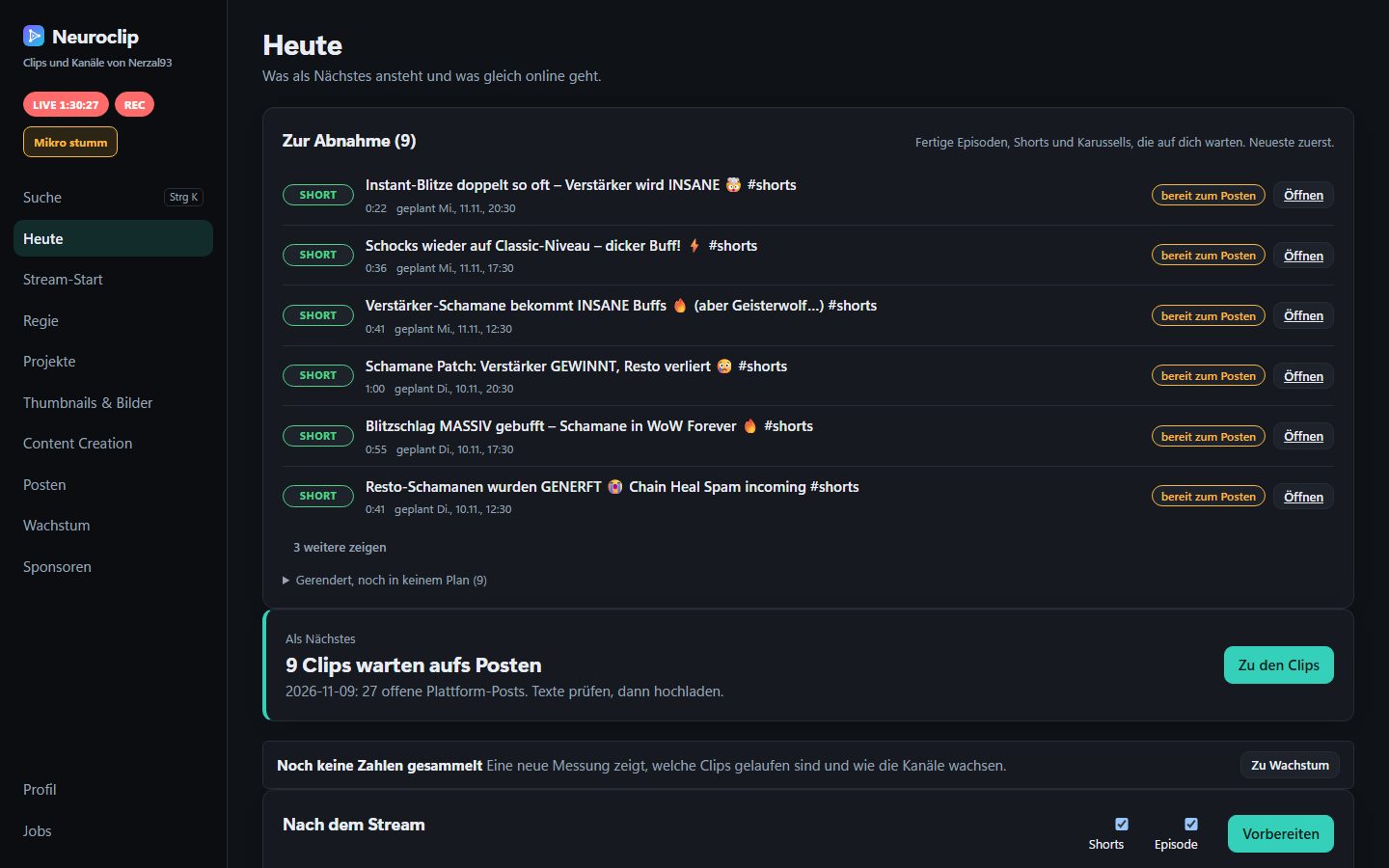
The “today” page of the dashboard: what is running, what is ready and what waits for review.
Component overview
Neuroclip is one Go program plus a few satellites. Internally the Go program is called the cockpit.
| Component | What it is | Why it is separate |
|---|---|---|
| Cockpit | One Go process: HTTP API, job runner, OBS client, render logic. | The single owner of state and of every child process. |
| Dashboard | A React and TypeScript single-page app. | Talks only to the cockpit’s API. The cockpit serves the built files. |
| Upload bridge | A small local server. | Hands full-quality files to the browser extension. |
| Browser extension | Puts files into the upload forms of video platforms. | Some platforms have no usable upload API; the browser is the API. |
| Python helpers | Speech recognition, person tracking, background removal. | The ML ecosystem for these lives in Python. |
| Claude jobs | The claude CLI, started headless by the cockpit. | Ranking and naming moments is a language task. |
Two details matter more than they look:
- Child processes, not libraries. The cockpit never links ffmpeg or the speech model. It starts them as processes, streams their output into a capped log, and can kill the whole tree. A crash in a helper is a failed job, not a dead server. Go also keeps the cockpit a single, easy-to-ship binary (see Containerization and Go for why that matters).
- The dashboard is not special. It is a client of a plain HTTP API with Server-Sent Events for live logs (SSE spec). Remote controls reach the cockpit the same way.
The code is organised as many small packages with one vocabulary each. If you have read my post on bounded contexts, this is the same instinct at package scale: a small surface per package, and the HTTP layer as the only place that stitches them together.
Streaming PC versus server
Neuroclip is local-first: videos, profile and credentials stay on the streamer’s machine. The same binary can also run in a container on a server (more in Part 5). The interesting question is which parts can move.
What must stay on the streaming PC:
- OBS and its WebSocket. OBS runs where the stream runs.
- Hotkeys for markers and clips while streaming.
- The upload bridge and the browser extension. They work inside the streamer’s logged-in browser.
- GPU-heavy work such as speech recognition, where a GPU is where the speed is (a CPU fallback exists).
- Claude jobs, which run the streamer’s own
claudeCLI.
A server can serve the dashboard and the API, hold the workspace as a volume, and run the parts that do not need the desktop. The boundary is enforced, not hoped for: the server refuses to listen beyond loopback without authentication, the dashboard asks which capabilities this machine offers, and each tool declares what it needs. A job whose need is missing is refused with a human-readable reason instead of failing halfway through.
I want to be honest about the state of this: the container path exists, but the product is an early-access beta with exactly one user, me. The split above is the design, not something proven at scale.
The data flow: stream to upload
The path, step by step:
- Stream. OBS records or streams with separate audio tracks (mix, microphone, game). Separate tracks make later steps reliable: speech recognition only needs the microphone.
- VOD and chat. The cockpit fetches the VOD and the chat through Twitch’s public APIs.
- Transcribe. A helper runs Whisper over the microphone track.
- Analyse. Audio and transcript signals become candidate moments.
- Suggest. Either a Claude job or a rule-based ranking scores the candidates.
- Edit. The streamer opens a suggestion in the project editor and adjusts the cut.
- Render. ffmpeg produces the short or episode.
- Ready. The result lands in a ready folder together with a small plan: title, description, targets.
- Review. The streamer approves in the dashboard — or sends it back to the editor.
- Upload. Via a platform API or through the bridge and extension.
Two rules sit on top of this flow. Claude jobs never upload: posting tools are simply not available to them. And nothing is published without a human confirming in the dashboard. Part 2 covers the middle of this flow.
Claude as an optional enhancement, not a dependency
I use the claude CLI headless for tasks that are really language problems: scoring candidate moments, naming episodes, proposing chapters. The cockpit starts it as a child process. Because those sessions read other people’s chat and speech, they run with restricted permissions: no access to secrets, no editing of code or settings, no posting tools.
The design decision I care about most: every Claude path has a non-LLM fallback. If the CLI is not installed, or the streamer prefers it, the editor shows a rule-based ranking instead. It merges several signals — loudness, hype words, chat activity, markers pressed live, clips made by viewers — into one score, and signals that land close together count as one moment. Agreement between different kinds of signals raises the score. It also shows the reasons next to each suggestion, so a ranking is never a black box.
The shape matters more than the numbers. The ranking is a pure function, and a separate integrating function reads the files and writes the result. That is the IOSP rule (integration operation segregation principle) I try to follow everywhere: a function either integrates other functions or computes, never both.
// rank is pure: same input, same ordered list. No files, no clock, no network.
func rank(signals []Signal) []Moment {
    moments := groupNearbySignals(signals)
    for index := range moments {
        moments[index].Score = scoreMoment(moments[index])
    }
    sortByScore(moments)
    return moments
}

// generateSuggestions integrates: load, rank, store.
func generateSuggestions(source Source, sink Sink) error {
    signals, err := source.Load()
    if err != nil {
        return err
    }
    return sink.Store(rank(signals))
}
This is a generic illustration of the pattern, not product code. The pure core is easy to test with table-driven cases, and the fallback is not a degraded afterthought but a first-class path.
The job runner and Go concurrency
Every tool that does real work — render, transcribe, analyse, upload — goes through one job manager. The API starts a job, gets back an ID, and the dashboard follows the log via SSE.
The design choices, in general terms:
- Whitelisted tools only. A job is a tool ID plus validated values. Paths are resolved against the workspace before anything starts, and the argument list is built from checked values, never through a shell.
- One running job per tool. The slot is reserved under a mutex before the process starts, so two quick clicks cannot start the same render twice.
- A capped log. Each job keeps only the tail of its output, so a chatty tool cannot eat memory.
- An injected starter function. Tests pass a fake that never starts a process; production passes the real one.
The concurrency model is deliberately boring: a mutex-protected map, one goroutine waiting per job, and a channel that is closed and replaced on every change to wake the SSE readers. No worker pool, no queue library.
Killing a process tree
Cancelling a job sounds trivial and is not. A tool may start a helper, which starts another program. exec.CommandContext only kills the direct child, so grandchildren can survive and keep pipes open. The general fix is a custom Cancel plus a WaitDelay (both added in Go 1.20, see the os/exec documentation):
cmd := exec.CommandContext(ctx, "ffmpeg", "-version")
cmd.Cancel = func() error {
    killProcessTree(cmd.Process.Pid) // platform-specific, see below
    return cmd.Process.Kill()
}
cmd.WaitDelay = 5 * time.Second // a surviving grandchild can hold the pipes open
On Linux, start the child in its own process group (SysProcAttr{Setpgid: true}) and send SIGKILL to the negative PID. On Windows, taskkill /PID <pid> /T /F kills the tree. Keep each variant in its own file with a build constraint instead of scattering runtime.GOOS checks.
Panics must not end the evening
A long-running local server must survive a bug in one goroutine. Two small helpers do most of the work: one turns a panic into an error, and one runs a goroutine that recovers and notifies its owner, so state like “a flow is active” can be reset instead of blocking the next run. HTTP handlers are wrapped so a panic becomes a JSON 500 instead of a dropped connection.
Live saver mode: do not eat the streamer’s CPU
This is the part that made the project feel like real engineering. A streaming PC has one job at full load: OBS plus the game. If the cockpit starts an ffmpeg render at normal priority in the middle of a stream, the stream can drop frames. A tool that helps after the stream must not hurt during it.
A static review of the code found a classic problem: status checks against OBS were expensive, because every call opened a new WebSocket connection, logged in and asked many questions, and several callers polled it all the time. The first fix is a small, short-lived cache shared by all callers.
The second fix is a live saver mode. While OBS is streaming and the streamer has enabled it in the profile, the cockpit turns several levers at once:
- Lower process priority for child processes, including jobs that already run.
- Fewer ffmpeg threads.
- A smaller
GOMAXPROCSfor the cockpit itself. - Less frequent UI updates and deferred background measurements.
It needs all of them because runtime.GOMAXPROCS limits only the threads that execute Go code. It does not limit child processes. Two details I like: an OBS that does not answer counts as “not streaming”, because there is nothing to protect, and GOMAXPROCS returns to the value it had at start when the stream ends, not to an assumed default.
On Windows, priority is a creation flag for new processes (BELOW_NORMAL_PRIORITY_CLASS) and SetPriorityClass for running ones; children inherit the class, so a Python-to-ffmpeg chain steps back as well. A related idea, asking before a heavy job starts live and queueing it until the stream ends, is on the roadmap, not in the product.
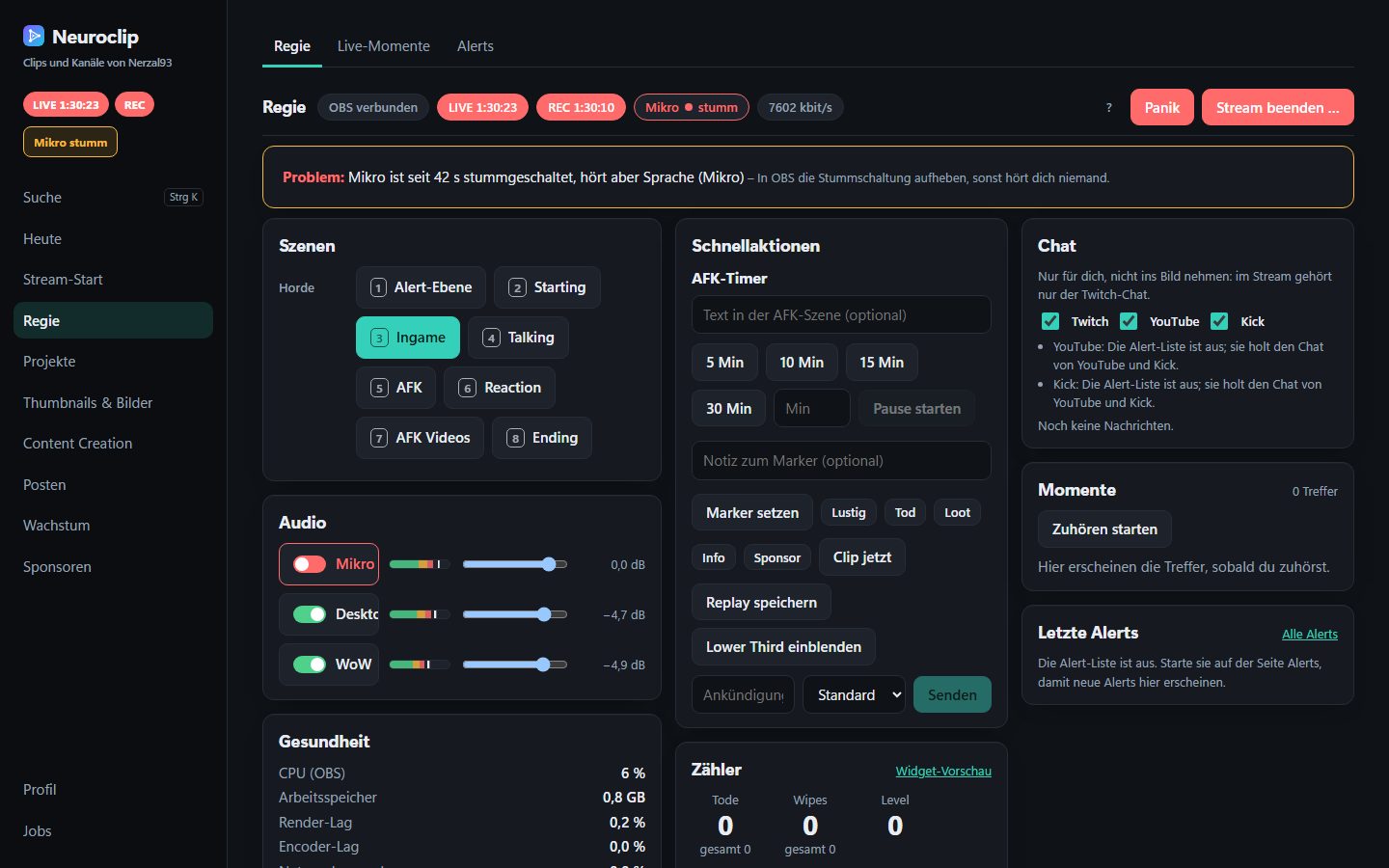
The Regie page is the live-side counterpart of the cockpit; Part 3 is about how it talks to OBS.
Workspace and profile: designing for someone who is not me
Neuroclip started as my own tool, and the first version was full of me: my channel name in a string, my hype words, my folder layout. Turning it into something other streamers could use meant a rule I now apply to every change: no streamer-specific value in code.
Two things replace them:
- The workspace. One folder holds all personal data — videos, reports, state files. It is git-ignored, and any path coming from the browser is checked so an API call cannot escape it.
- The profile. A typed configuration with the streamer’s handles, language, hype words, caption style and upload targets. Secrets live separately, and a pre-commit hook blocks both from being committed.
Every field has a neutral default, so a missing key never becomes a surprise and the format stays forgiving across versions.
Finder functions with an environment override
External programs are the other place where “works on my machine” hides. ffmpeg, optional upscalers, the claude CLI and a browser are installed in different places on different machines. The pattern I use for all of them: a finder with a fixed lookup order where an environment variable always wins. Here it is for ffmpeg:
// findFFmpeg returns $FFMPEG if set, otherwise ffmpeg from the PATH.
func findFFmpeg(environmentValue string, lookPath func(string) (string, error)) (string, error) {
    if environmentValue != "" {
        return environmentValue, nil
    }
    return lookPath("ffmpeg")
}
The deciding function takes its lookups as parameters, so a unit test covers every branch without installing anything, while a thin caller wires in os.Getenv and exec.LookPath. To point a tool at a specific ffmpeg:
export FFMPEG=/usr/local/bin/ffmpeg
$env:FFMPEG = "C:\tools\ffmpeg\bin\ffmpeg.exe"
If you need ffmpeg itself, the official download page lists builds for both platforms. A missing optional program is a capability the dashboard shows as unavailable with a reason, not a crash.
Testing on Windows and Linux
The cockpit is developed on Windows and ships as a Linux container, so both platforms matter. I run the full suite with the race detector locally on Windows, and CI runs the Go tests on Linux. I am being exact on purpose: CI does not run on Windows. Windows-specific code is covered by test files that only run on my machine. That is a known gap.
Platform differences are isolated by file suffix and build constraints (_windows.go, _other.go) rather than if runtime.GOOS == ... scattered through the code. To run the usual checks on any Go project:
go vet ./... && go test -race ./...
go vet ./...; if ($?) { go test -race ./... }
Install Go from go.dev/doc/install; the race detector is described in go.dev/doc/articles/race_detector.
What I would do differently
- Fewer, bigger packages at the start. I over-split, and navigating many tiny packages has a cost.
- Native Go earlier. The Python helpers are the weakest part of the install story. Replacing them is planned, not done.
- A Windows CI runner. The honest answer to the testing gap above.
What’s next
Next is the core of the product: Part 2, from VOD to short, with the general ffmpeg and subtitle techniques behind it. If you stream and want to try Neuroclip while it is in early access, the Neuroclip page has the details.